

Subscribe to Updates

    Get the latest creative news from FooBar about art, design and business.

    What's Hot

    Your iPhone videos are getting auto-captions in iOS 27

    Pixel Watch software update broke one of its most useful features

    Meta’s latest app wants you to forget about Reddit and embrace the AI

    Facebook Twitter Instagram
    • Tech
    • Gadgets
    • Spotlight
    • Gaming
    Facebook Twitter Instagram
    circuitthoughtscircuitthoughts
    Subscribe
    • Home
    • Gadgets
    • Insights
    • Apps

      Google Uses AI Searches To Detect If Someone Is In Crisis

      Gboard Magic Wand Button Will Covert Your Text To Emojis

      Android 10 & Older Devices Now Getting Automatic App Permissions Reset

      Spotify Blend Update Increases Group Sizes, Adds Celebrity Blends

      Samsung May Improve Battery Significantly With Galaxy Watch 5

    • Gear
    • Mobiles
      1. Tech
      2. Gadgets
      3. Insights
      4. View All

      Your iPhone videos are getting auto-captions in iOS 27

      Pixel Watch software update broke one of its most useful features

      Meta’s latest app wants you to forget about Reddit and embrace the AI

      T-Mobile, Verizon offer various Motorola Razr models for free

      March Update May Have Weakened The Haptics For Pixel 6 Users

      Project 'Diamond' Is The Galaxy S23, Not A Rollable Smartphone

      The At A Glance Widget Is More Useful After March Update

      Pre-Order The OnePlus 10 Pro For Just $1 In The US

      Motorola Edge+ Review: It Checks A Lot Of Boxes

      This Smartphone Concept Design Is Different… In A Good Way

      Twitter Just Made Searching Your Direct Messages Better

      That Netflix Price Hike Is Starting To Take Place

      Latest Huawei Mobiles P50 and P50 Pro Feature Kirin Chips

      Samsung Galaxy M62 Benchmarked with Galaxy Note10’s Chipset

      9.1

      Review: T-Mobile Winning 5G Race Around the World

      8.9

      Samsung Galaxy S21 Ultra Review: the New King of Android Phones

    • Computing
    circuitthoughtscircuitthoughts
    Home»Tech»Computing»Pixel Watch users get more upset as two more issues await a fix from Google
    Computing

    Pixel Watch users get more upset as two more issues await a fix from Google

    adminBy No Comments4 Mins Read
    Facebook Twitter Pinterest LinkedIn Tumblr Email
    Share
    Facebook Twitter LinkedIn Pinterest Email

    Back in March we told you that an update sent to the Pixel Watch left the timepiece unable to track users’ sleep-related data. Important metrics such as overnight Blood Oxygen and skin temperature readings could not be obtained by the timepiece. The devices affected were the Google Pixel Watch 4, Google Pixel Watch 3, and the Google Pixel Watch 2.

    Pixel Watch users do not see their sleep data on the timepiece

    While Google has yet to patch this issue, a new problem has made its way onto the wrists of Pixel Watch wearers. Sleep data is failing to appear on the display even though the data does appear inside the Fitbit app of users’ phones.

    On the Pixel Watch itself, the screen shows a message that says, “No recent data. Wear your watch to sleep,” even though the aforementioned Fitbit app shows that the watch is being worn to sleep and that the data is being collected in the background. The issue shows up for a few consecutive nights and the usually reliable quick fixes, such as restarting the device, aren’t doing the job.

    Another issue involves the Pixel Watch 4 and its failure to count steps during workouts

    This is not an isolated incident. All you need to do is tap on this link taking you to Reddit, and you’ll see the very same complaint coming from various Pixel Watch users. A Pixel Watch 4 user had another complaint as he posted on Reddit that his watch failed to count steps during workouts and only measure his heart rate and calories consumed.

    Google is quickly adding to its poor reputation for customer service. As a Pixel owner myself, I’m glad that I haven’t had to interact with the company over a bug or some other issue. That also goes for my first Pixel, the Pixel 2 XL.

    But Pixel Watch users have been dealing with the inability to get Blood Oxygen measurements and skin temperature readings since March. That month’s software update caused the timepiece’s operating system to forget that the Fitbit app is supposed to have access to the sensors overnight. With the bug causing the permissions page to go blank, users can’t request that the Fitbit app get permission to access the data from the Pixel Watch sensors.

    Try these workarounds to get overnight Blood Oxygen and skin temperature data back on your watch

    There are some workarounds to see the Blood Oxygen and skin temperature overnight numbers on your Pixel Watch. Long-press the Fitbit app icon on your Pixel Watch and go to App Info / Permissions > Fitness & Wellness and check the toggles for Blood Oxygen and Temperature readings. If they are off, toggle them back to “All the time.”
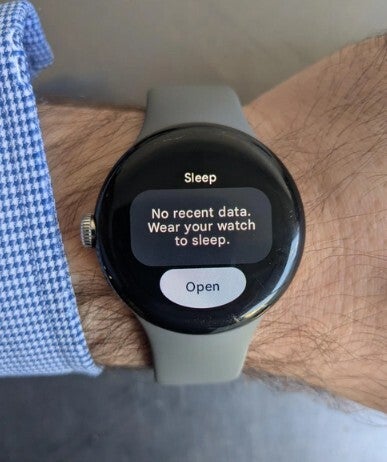
    Picture of a bug-infested Pixel Watch and the message it has for users.Picture of a bug-infested Pixel Watch and the message it has for users.

    The message that affected Pixel Watch units show instead of their sleep data. | Image by Reddit

    The most successful workaround is as follows. Open the settings on your Pixel Watch and force stop the Fitbit app. Clear the cache and data and do the same thing to the Fitbit app on the phone paired with your Pixel Watch. Restart both the watch and the phone.

    Google says that it is working on a fix

    As a last resort, implementing a factory reset for your Pixel Watch has been endorsed by Google’s official Pixel Community account. Of course, doing this will wipe all of your data and apps off of your timepiece and frankly, most people would not want to do this. Even though this is the last resort, there is no guarantee that this will work, and you will have wiped your watch for no reason.

    Google says that it is actively working on a fix, and we hope that the Alphabet subsidiary is working on all three bugs at the same time. To refresh your memory, the trio includes:

    • The overnight Blood Oxygen and skin temperature readings fail to appear on the watch.
    • Sleep data isn’t appearing on the Pixel Watch, although it does show up on the Fitbit app. The timepiece shows a message reading, “No recent data. Wear your watch to sleep.”
    • The Pixel Watch doesn’t count steps and only measures heart rate and calories consumed.

    Hopefully, Google will push out a fix for these issues very soon.

    Get Visible as low as $20/mo for 1 year. Limited time offer with code: FRESHSTART

    Get Visible as low as $20/mo for 1 year. Limited time offer with code: FRESHSTART

    Offer Ends 6.1.2026 at 11.59pm ET. New members get $5/mo off the $25/mg Visible plan, $35/mo Visible+ plan, or $45/mo Visible+ Pro plan for the first 12 months. Promo code FRESHSTART required at checkout.


    Buy at Visible

    Read the latest from Alan Friedman

    #Pixel #Watch #users #upset #issues #await #fix #Google

    await fix Google Issues Pixel upset Users Watch
    Share. Facebook Twitter Pinterest LinkedIn Tumblr Email

    Related Posts

    Your iPhone videos are getting auto-captions in iOS 27

    Pixel Watch software update broke one of its most useful features

    Meta’s latest app wants you to forget about Reddit and embrace the AI

    Add A Comment

    Leave A Reply Cancel Reply

    Editors Picks
    8.5

    Apple Planning Big Mac Redesign and Half-Sized Old Mac

    Autonomous Driving Startup Attracts Chinese Investor

    Onboard Cameras Allow Disabled Quadcopters to Fly

    Top Reviews
    9.1

    Review: T-Mobile Winning 5G Race Around the World

    By
    8.9

    Xiaomi Mi 10: New Variant with Snapdragon 870 Review

    By
    8.9

    Samsung Galaxy S21 Ultra Review: the New King of Android Phones

    By
    circuitthoughts
    Facebook Twitter Instagram Pinterest Vimeo YouTube
    • Home
    • Tech
    • Gadgets
    • Mobiles
    • Our Authors
    © 2026 ThemeSphere. Designed by WPfastworld.

    Type above and press Enter to search. Press Esc to cancel.