Subscribe to Updates

    Get the latest creative news from FooBar about art, design and business.

    What's Hot

    T-Mobile rep warns customers about what is going on in his store

    AT&T, T-Mobile, and Verizon coalition explains why users won’t benefit from US-based call centers

    T-Mobile’s record-breaking subsidy for the Razr Fold makes “On Us” deal for foldable iPhone likely

    Facebook Twitter Instagram
    • Tech
    • Gadgets
    • Spotlight
    • Gaming
    Facebook Twitter Instagram
    circuitthoughtscircuitthoughts
    Subscribe
    • Home
    • Gadgets
    • Insights
    • Apps

      Google Uses AI Searches To Detect If Someone Is In Crisis

      Gboard Magic Wand Button Will Covert Your Text To Emojis

      Android 10 & Older Devices Now Getting Automatic App Permissions Reset

      Spotify Blend Update Increases Group Sizes, Adds Celebrity Blends

      Samsung May Improve Battery Significantly With Galaxy Watch 5

    • Gear
    • Mobiles
      1. Tech
      2. Gadgets
      3. Insights
      4. View All

      T-Mobile rep warns customers about what is going on in his store

      AT&T, T-Mobile, and Verizon coalition explains why users won’t benefit from US-based call centers

      T-Mobile’s record-breaking subsidy for the Razr Fold makes “On Us” deal for foldable iPhone likely

      A recent smart ring data hack should worry every Galaxy Ring owner, even the ones who dodged it

      March Update May Have Weakened The Haptics For Pixel 6 Users

      Project 'Diamond' Is The Galaxy S23, Not A Rollable Smartphone

      The At A Glance Widget Is More Useful After March Update

      Pre-Order The OnePlus 10 Pro For Just $1 In The US

      Motorola Edge+ Review: It Checks A Lot Of Boxes

      This Smartphone Concept Design Is Different… In A Good Way

      Twitter Just Made Searching Your Direct Messages Better

      That Netflix Price Hike Is Starting To Take Place

      Latest Huawei Mobiles P50 and P50 Pro Feature Kirin Chips

      Samsung Galaxy M62 Benchmarked with Galaxy Note10’s Chipset

      9.1

      Review: T-Mobile Winning 5G Race Around the World

      8.9

      Samsung Galaxy S21 Ultra Review: the New King of Android Phones

    • Computing
    circuitthoughtscircuitthoughts
    Home»Tech»Computing»Google Messages is quietly fixing a terrible UI decision that made texting needlessly painful
    Computing

    Google Messages is quietly fixing a terrible UI decision that made texting needlessly painful

    adminBy No Comments4 Mins Read
    Facebook Twitter Pinterest LinkedIn Tumblr Email
    Share
    Facebook Twitter LinkedIn Pinterest Email

    Google doesn’t always add completely new features to its apps; sometimes it restores things it removed, thinking users would like the change but later finding most users were unhappy. The latest feature the company is reintroducing is an easier way to switch between two SIMs when sending texts with Google Messages.

    What’s the issue with Google Messages currently

    Google Messages was always convenient and friendly for those using dual SIMs on their smartphones. Once you were done writing your message, you simply had to tap the SIM icon next to the text box and select the SIM from which you wanted to send the message.

    But I really don’t know why the company changed this UI and made it a lot more complicated to switch between SIMs in Google Messages. Currently, you need to first launch the Messages app, select the person to whom you want to send the text, tap their profile, and then select your preferred SIM from the Send with switcher.
    Basically, the current approach requires a lot of taps and is much more complicated than before.

    Google might be rectifying its mistake

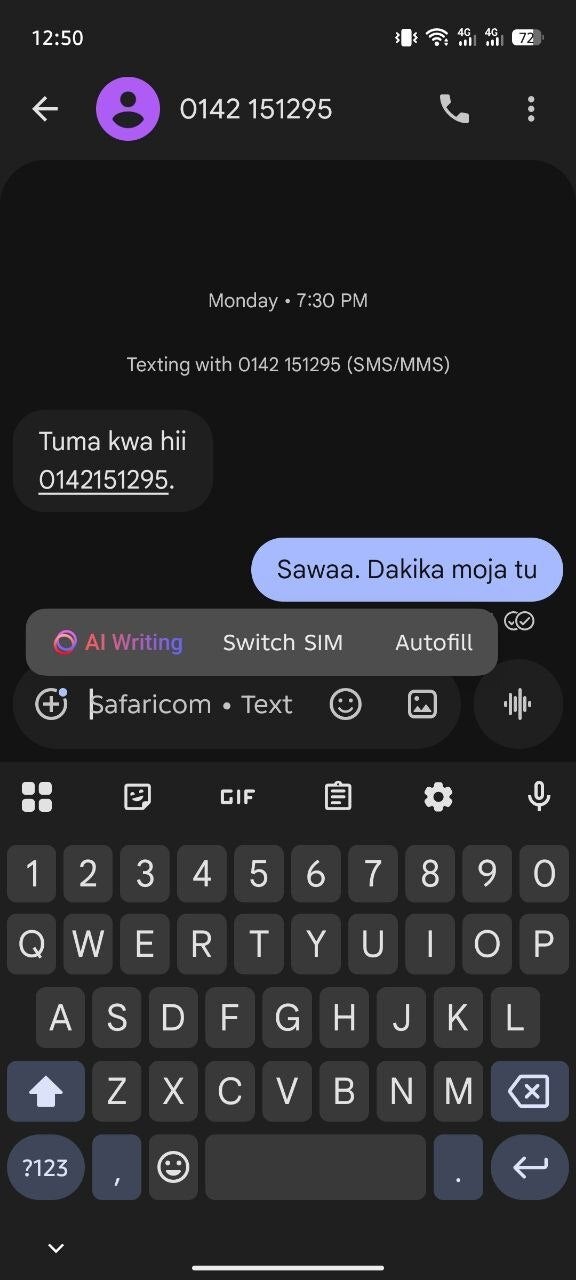
    Switch SIM option in Google Messages.Switch SIM option in Google Messages.

    Switch SIM option in Google Messages. | Image by Piunikaweb

    The good news is that Google has apparently realized that the current method of switching between two installed SIMs isn’t the most convenient. While the company is not reverting to the previous UI, it has reportedly added a new design.

    The change has been spotted in the beta build of the Google Messages app. You now simply need to tap and hold the compose box, and then a floating pop-up menu will appear with three options – AI Writing, Autofill, and Switch SIM.
    The addition of this Switch SIM option is definitely good news, but there’s a catch that you need to be aware of. As it turns out, you would think that tapping on this option would instantly switch between the first and second SIM. But unfortunately this isn’t the case.
    Tapping the button actually takes you to the SIM picker option that you find in the profiles page of the contact to whom you want to send the text. So, basically you are still changing your active SIM from the same place; it’s just that you have gotten a new shortcut to instantly reach that location.
    That said, it isn’t as though Google gave us a surprise out of nowhere by making this UI change. We already got a hint last year that something like this could happen very soon.

    There’s a quality-of-life update as well

    In addition to introducing a completely new SIM switch option, the latest beta build of the Google Messages app brings a small but important quality-of-life change as well. When both you and the person to whom you are trying to send the message have RCS enabled, then you will see “RCS message” written in the empty text field. When the other person doesn’t have RCS Chat enabled, the text field will show “Text message.”

    In the latest beta build, the “Text message” visual from the empty text field has been replaced with the name of the active carrier. For instance, you might see “Airtel” written in the empty text field if it is selected as your active carrier.

    It could have been more seamless

    Using more than one SIM card isn’t as common these days as it used to be before, but there’s definitely a significant number of users who still use two SIMs on their phones. I remember having a Chinese smartphone in my childhood that allowed installing up to four SIM cards.

    Anyway, people were really not happy with Google messing up the SIM switching UI in its messaging app for really no reason. A post on the Google Community forum clearly indicates that users really liked the previous design.

    That said, the UI change that has been spotted in the beta build is definitely more practical than what is currently available, but I believe it could have been a lot more seamless. It would have been better if tapping the Switch SIM option had instantly switched to the other installed SIM.

    Get Visible as low as $20/mo for 1 year. Limited time offer with code: FRESHSTART

    Get Visible as low as $20/mo for 1 year. Limited time offer with code: FRESHSTART

    Offer Ends 6.1.2026 at 11.59pm ET. New members get $5/mo off the $25/mg Visible plan, $35/mo Visible+ plan, or $45/mo Visible+ Pro plan for the first 12 months. Promo code FRESHSTART required at checkout.


    Buy at Visible

    Read the latest from Aman Kumar

    #Google #Messages #quietly #fixing #terrible #decision #texting #needlessly #painful

    decision fixing Google Messages needlessly painful quietly terrible texting
    Share. Facebook Twitter Pinterest LinkedIn Tumblr Email

    Related Posts

    T-Mobile rep warns customers about what is going on in his store

    AT&T, T-Mobile, and Verizon coalition explains why users won’t benefit from US-based call centers

    T-Mobile’s record-breaking subsidy for the Razr Fold makes “On Us” deal for foldable iPhone likely

    Add A Comment

    Leave A Reply Cancel Reply

    Editors Picks
    8.5

    Apple Planning Big Mac Redesign and Half-Sized Old Mac

    Autonomous Driving Startup Attracts Chinese Investor

    Onboard Cameras Allow Disabled Quadcopters to Fly

    Top Reviews
    9.1

    Review: T-Mobile Winning 5G Race Around the World

    By
    8.9

    Samsung Galaxy S21 Ultra Review: the New King of Android Phones

    By
    8.9

    Xiaomi Mi 10: New Variant with Snapdragon 870 Review

    By
    circuitthoughts
    Facebook Twitter Instagram Pinterest Vimeo YouTube
    • Home
    • Tech
    • Gadgets
    • Mobiles
    • Our Authors
    © 2026 ThemeSphere. Designed by WPfastworld.

    Type above and press Enter to search. Press Esc to cancel.