


Subscribe to Updates

    Get the latest creative news from FooBar about art, design and business.

    What's Hot

    This Galaxy S26+ promo is the best one you can grab right now

    Huawei Pura 90s Pro Max vs Xiaomi 17 Ultra: Sample Photos Comparison

    AT&T wants you to forget the FIFA World Cup final and points at another sports event this weekend

    Facebook Twitter Instagram
    • Tech
    • Gadgets
    • Spotlight
    • Gaming
    Facebook Twitter Instagram
    circuitthoughtscircuitthoughts
    Subscribe
    • Home
    • Gadgets
    • Insights
    • Apps

      Google Uses AI Searches To Detect If Someone Is In Crisis

      Gboard Magic Wand Button Will Covert Your Text To Emojis

      Android 10 & Older Devices Now Getting Automatic App Permissions Reset

      Spotify Blend Update Increases Group Sizes, Adds Celebrity Blends

      Samsung May Improve Battery Significantly With Galaxy Watch 5

    • Gear
    • Mobiles
      1. Tech
      2. Gadgets
      3. Insights
      4. View All

      This Galaxy S26+ promo is the best one you can grab right now

      Huawei Pura 90s Pro Max vs Xiaomi 17 Ultra: Sample Photos Comparison

      AT&T wants you to forget the FIFA World Cup final and points at another sports event this weekend

      T-Mobile has had enough of customers bickering to the FCC

      March Update May Have Weakened The Haptics For Pixel 6 Users

      Project 'Diamond' Is The Galaxy S23, Not A Rollable Smartphone

      The At A Glance Widget Is More Useful After March Update

      Pre-Order The OnePlus 10 Pro For Just $1 In The US

      Motorola Edge+ Review: It Checks A Lot Of Boxes

      This Smartphone Concept Design Is Different… In A Good Way

      Twitter Just Made Searching Your Direct Messages Better

      That Netflix Price Hike Is Starting To Take Place

      Latest Huawei Mobiles P50 and P50 Pro Feature Kirin Chips

      Samsung Galaxy M62 Benchmarked with Galaxy Note10’s Chipset

      9.1

      Review: T-Mobile Winning 5G Race Around the World

      8.9

      Samsung Galaxy S21 Ultra Review: the New King of Android Phones

    • Computing
    circuitthoughtscircuitthoughts
    Home»Tech»Computing»New Device Care feature allows Galaxy users to block apps spewing out excessive ad notifications
    Computing

    New Device Care feature allows Galaxy users to block apps spewing out excessive ad notifications

    adminBy No Comments4 Mins Read
    Facebook Twitter Pinterest LinkedIn Tumblr Email
    Share
    Facebook Twitter LinkedIn Pinterest Email

    The new version of the Samsung Device Care system app has a new feature you might want

    Device Care is a built-in system app that you might call an optimization suite that is designed to improve aspects of a Galaxy phone such as battery life, performance, and security. Besides Galaxy handsets, the app performs the same functions on Galaxy tablets and PCs.

    Unlike your typical app, which you find by looking for the icon in the app drawer, Samsung Device Care can be accessed through the Settings menu. Go to Settings > Device Care (or Battery and device care on older models). Or, you can use the search bar in Settings and type in “Device Care.”

    Once opened, you’ll see tools for:

    • Battery.
    • Storage.
    • Memory (RAM).
    • Device protection.
    • App optimization.

    Toggle on the Excessive Ad Blocking feature to block apps that push out excessive ad notifications

    The new version of Device Care features a toggle that will allow you to enable a feature known as Excessive Ad Blocking that detects and blocks third-party apps that hit users with “frequent advertisement alerts”. With the feature enabled, third-party apps that send frequent advertising alerts are put in deep sleep so that they can’t bother you with these notifications.

    Apps in deep sleep can be viewed by going to Settings > Device care > Care report > Excessive alerts. There are two different options for blocking the apps spewing out excessive ad alerts. A “basic” setting uses Samsung’s own data to block these apps whenever they appear on your handset.
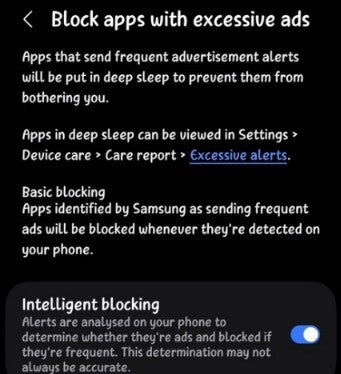
    Settings menu for Device Care.Settings menu for Device Care.

    Settings menu for the new feature on the Device Care app.| Image by @KAILASH61229293

    Virtual Memory has been around for years; I just think it is useful and cool

    An “intelligent” setting analyzes the notifications to determine if they have something to do with advertisements. If they do, the offending apps are blocked since the system has thus determined that they are sending too many ads via notifications. Keep in mind that this feature is not an ad blocker, but when the setting is enabled, it recognizes apps and blocks them from sending notifications if they are sending excessive ad alerts.

    An older feature allows you to free up RAM by shutting down apps running in the background by going to Settings > Device care > Memory > Clean now. Doing this will also help extend your phone’s battery life. Yeah, this feature has been available for years, unlike the new one that blocks apps from sending excessive ad notifications. Honestly, I just think that this is an interesting feature and wanted those not familiar with it to know that it is available.

    Where to find the updated version of Device Care

    If you want to prevent certain apps from shutting down in the background, you can go to the Memory menu and have them added to the Excluded apps list. Another cool feature on the Device Care app is called Virtual Memory, and it allows you to turn part of your phone’s internal storage into as much as 8 GB of RAM. Inactive apps are moved to the virtual memory freeing up physical RAM for active apps.

    The updated version of Device Care is available from the Galaxy Store, and some say that it has already been found on the Galaxy S26 series for a few months. If you can’t find it in the Galaxy Store, you might want to make sure that you’ve installed the stable version of One UI 8.5, which is also supposed to carry the updated Device Care app.

    Devices that have been sent the stable One UI 8.5 update include:

    Get Visible as low as $20/mo for 1 year. Limited time offer with code: FRESHSTART

    Get Visible as low as $20/mo for 1 year. Limited time offer with code: FRESHSTART

    Offer Ends 6.1.2026 at 11.59pm ET. New members get $5/mo off the $25/mg Visible plan, $35/mo Visible+ plan, or $45/mo Visible+ Pro plan for the first 12 months. Promo code FRESHSTART required at checkout.


    Buy at Visible

    Read the latest from Alan Friedman

    #Device #Care #feature #Galaxy #users #block #apps #spewing #excessive #notifications

    apps block care Device excessive feature Galaxy notifications spewing Users
    Share. Facebook Twitter Pinterest LinkedIn Tumblr Email

    Related Posts

    This Galaxy S26+ promo is the best one you can grab right now

    Huawei Pura 90s Pro Max vs Xiaomi 17 Ultra: Sample Photos Comparison

    AT&T wants you to forget the FIFA World Cup final and points at another sports event this weekend

    Add A Comment

    Leave A Reply Cancel Reply

    Editors Picks
    8.5

    Apple Planning Big Mac Redesign and Half-Sized Old Mac

    Autonomous Driving Startup Attracts Chinese Investor

    Onboard Cameras Allow Disabled Quadcopters to Fly

    Top Reviews
    9.1

    Review: T-Mobile Winning 5G Race Around the World

    By
    8.9

    Samsung Galaxy S21 Ultra Review: the New King of Android Phones

    By
    8.9

    Xiaomi Mi 10: New Variant with Snapdragon 870 Review

    By
    circuitthoughts
    Facebook Twitter Instagram Pinterest Vimeo YouTube
    • Home
    • Tech
    • Gadgets
    • Mobiles
    • Our Authors
    © 2026 ThemeSphere. Designed by WPfastworld.

    Type above and press Enter to search. Press Esc to cancel.