

Subscribe to Updates

    Get the latest creative news from FooBar about art, design and business.

    What's Hot

    Motorola’s tough Moto G Power (2026) is now paired with gifts worth $250

    Google wallet to launch digital ID Passes in select EU countries this summer

    iPhone Air Size Guide: A close-up look at Apple’s most radical design

    Facebook Twitter Instagram
    • Tech
    • Gadgets
    • Spotlight
    • Gaming
    Facebook Twitter Instagram
    circuitthoughtscircuitthoughts
    Subscribe
    • Home
    • Gadgets
    • Insights
    • Apps

      Google Uses AI Searches To Detect If Someone Is In Crisis

      Gboard Magic Wand Button Will Covert Your Text To Emojis

      Android 10 & Older Devices Now Getting Automatic App Permissions Reset

      Spotify Blend Update Increases Group Sizes, Adds Celebrity Blends

      Samsung May Improve Battery Significantly With Galaxy Watch 5

    • Gear
    • Mobiles
      1. Tech
      2. Gadgets
      3. Insights
      4. View All

      Motorola’s tough Moto G Power (2026) is now paired with gifts worth $250

      Google wallet to launch digital ID Passes in select EU countries this summer

      iPhone Air Size Guide: A close-up look at Apple’s most radical design

      Can a new US phone network with a sub $15/month plan convince you to switch from T-Mobile or Verizon?

      March Update May Have Weakened The Haptics For Pixel 6 Users

      Project 'Diamond' Is The Galaxy S23, Not A Rollable Smartphone

      The At A Glance Widget Is More Useful After March Update

      Pre-Order The OnePlus 10 Pro For Just $1 In The US

      Motorola Edge+ Review: It Checks A Lot Of Boxes

      This Smartphone Concept Design Is Different… In A Good Way

      Twitter Just Made Searching Your Direct Messages Better

      That Netflix Price Hike Is Starting To Take Place

      Latest Huawei Mobiles P50 and P50 Pro Feature Kirin Chips

      Samsung Galaxy M62 Benchmarked with Galaxy Note10’s Chipset

      9.1

      Review: T-Mobile Winning 5G Race Around the World

      8.9

      Samsung Galaxy S21 Ultra Review: the New King of Android Phones

    • Computing
    circuitthoughtscircuitthoughts
    Home»Tech»Computing»Galaxy S26 Ultra’s default browser is getting a new look
    Computing

    Galaxy S26 Ultra’s default browser is getting a new look

    adminBy No Comments4 Mins Read
    Facebook Twitter Pinterest LinkedIn Tumblr Email
    Share
    Facebook Twitter LinkedIn Pinterest Email

    My favorite Android browser (which apparently puts me in the minority) is the Samsung Browser, which has been recently renamed from the original “Samsung Internet Browser” moniker. To be precise, the new name for the browser debuts on One UI 8.5 which means that only those devices that have already received the update are calling the browser by its new name.

    There is a new look for the Samsung Browser’s toolbar

    The latest version of the browser app includes some code that will introduce a new blur effect for the browser’s toolbar. Android Authority was able to enable the new feature that delivers a blurred effect to the background of the toolbar. 

    You might shrug your shoulders, but a look at the images shared by Android Authority shows how the toolbar does look better with the new background blur. You’ll see it behind icons for the left arrow, right arrow, home, bookmarks (the star icon), Tabs, and the hamburger icon that opens a pop-up menu.

    The app’s pop-up menu is home to its cool features

    That pop-up menu is important to Samsung Browser users because that is where you’ll find the settings allowing you to enable Dark Mode, Ad Blockers, switch between the mobile and  desktop versions of a website, and more.
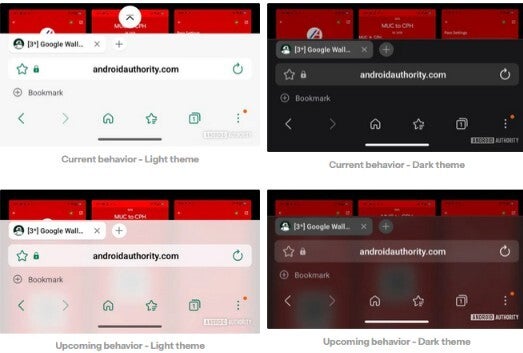
    Images show new toolbar background blur for Samsung Browser.Images show new toolbar background blur for Samsung Browser.

    Samsung Browser will soon have a background blur for the toolbar. | Image by Android Authority

    The code that points to a blur effect for the toolbar was found in version 30.0.2.30 of the browser app. The version of the app that is running on my Pixel 6 Pro with the latest Beta version of Android 17 running is version 29.0.12.

    The bookmark bar on Samsung Browser can be moved from the top to the bottom and it is when the bookmark bar is at the bottom that the blurred background is more noticeable.

    How to install Samsung Browser on your Android device

    If you have the Samsung Browser app installed on your Android phone, you can see which version you have by going to Settings > Apps > See all apps. Scroll down to Samsung Browser and tap on it to open the Samsung Browser App info page. Scroll to the very bottom to see which version of the app you currently have installed on your phone.
    Samsung Browser is installed by default on Galaxy phones and tablets. If you own a non-Galaxy Android phone, such as a Pixel, you can install Samsung Browser by simply tapping on this link and installing the app. Note how the browser is called Samsung Internet Browser in the Google Play Store. In the Galaxy Store, the app is known as Samsung Browser and you can find it by clicking on this link.

    The Samsung Browser adds some AI features

    Samsung Browser has added some AI capabilities over the last year including Intelligent Summarization, which produces short, concise summaries of long-form articles within the browser. The browser’s translation engine has been improved resulting in more accurate translation for over 20 languages. The browser’s accent colors now do a better job of matching the main colors of your phone’s wallpaper and system theme.

    One cool feature that has been around is the one that allows you to decide in advance if you want Samsung Browser to open a specific website when the app is opened. Samsung Browser will also open a “Picture-in-Picture” mode if you open your home screen or open another app while watching a video. Chrome’s “Picture-in-Picture” mode won’t work for some sites like YouTube.

    Whenever I purchase a new Android device, the Samsung Browser is one of the first, if not the first, app that I install. Samsung also offers a Beta version of the Samsung Internet Browser directly from the Play Store. Installing this will give you first crack at trying out new features that Samsung is still testing. You can install it from the Play Store by tapping on this link and from the Galaxy Store by tapping on this link. 

    Get Visible as low as $20/mo for 1 year. Limited time offer with code: FRESHSTART

    Get Visible as low as $20/mo for 1 year. Limited time offer with code: FRESHSTART

    Offer Ends 6.1.2026 at 11.59pm ET. New members get $5/mo off the $25/mg Visible plan, $35/mo Visible+ plan, or $45/mo Visible+ Pro plan for the first 12 months. Promo code FRESHSTART required at checkout.


    Buy at Visible

    Read the latest from Alan Friedman

    #Galaxy #S26 #Ultras #default #browser

    browser default Galaxy S26 Ultras
    Share. Facebook Twitter Pinterest LinkedIn Tumblr Email

    Related Posts

    Motorola’s tough Moto G Power (2026) is now paired with gifts worth $250

    Google wallet to launch digital ID Passes in select EU countries this summer

    iPhone Air Size Guide: A close-up look at Apple’s most radical design

    Add A Comment

    Leave A Reply Cancel Reply

    Editors Picks
    8.5

    Apple Planning Big Mac Redesign and Half-Sized Old Mac

    Autonomous Driving Startup Attracts Chinese Investor

    Onboard Cameras Allow Disabled Quadcopters to Fly

    Top Reviews
    9.1

    Review: T-Mobile Winning 5G Race Around the World

    By
    8.9

    Samsung Galaxy S21 Ultra Review: the New King of Android Phones

    By
    8.9

    Xiaomi Mi 10: New Variant with Snapdragon 870 Review

    By
    circuitthoughts
    Facebook Twitter Instagram Pinterest Vimeo YouTube
    • Home
    • Tech
    • Gadgets
    • Mobiles
    • Our Authors
    © 2026 ThemeSphere. Designed by WPfastworld.

    Type above and press Enter to search. Press Esc to cancel.