

Subscribe to Updates

    Get the latest creative news from FooBar about art, design and business.

    What's Hot

    Miss an iPhone payment? iOS 27 could lock you out of your apps

    I spent 72 hours with the Galaxy Z Fold 8: here is how the battery held up

    iPhone 18 Pro may end up with significantly cheaper OLED displays than before

    Facebook Twitter Instagram
    • Tech
    • Gadgets
    • Spotlight
    • Gaming
    Facebook Twitter Instagram
    circuitthoughtscircuitthoughts
    Subscribe
    • Home
    • Gadgets
    • Insights
    • Apps

      Google Uses AI Searches To Detect If Someone Is In Crisis

      Gboard Magic Wand Button Will Covert Your Text To Emojis

      Android 10 & Older Devices Now Getting Automatic App Permissions Reset

      Spotify Blend Update Increases Group Sizes, Adds Celebrity Blends

      Samsung May Improve Battery Significantly With Galaxy Watch 5

    • Gear
    • Mobiles
      1. Tech
      2. Gadgets
      3. Insights
      4. View All

      Miss an iPhone payment? iOS 27 could lock you out of your apps

      I spent 72 hours with the Galaxy Z Fold 8: here is how the battery held up

      iPhone 18 Pro may end up with significantly cheaper OLED displays than before

      Google just made the Pixel 11 wait pointless for many buyers

      March Update May Have Weakened The Haptics For Pixel 6 Users

      Project 'Diamond' Is The Galaxy S23, Not A Rollable Smartphone

      The At A Glance Widget Is More Useful After March Update

      Pre-Order The OnePlus 10 Pro For Just $1 In The US

      Motorola Edge+ Review: It Checks A Lot Of Boxes

      This Smartphone Concept Design Is Different… In A Good Way

      Twitter Just Made Searching Your Direct Messages Better

      That Netflix Price Hike Is Starting To Take Place

      Latest Huawei Mobiles P50 and P50 Pro Feature Kirin Chips

      Samsung Galaxy M62 Benchmarked with Galaxy Note10’s Chipset

      9.1

      Review: T-Mobile Winning 5G Race Around the World

      8.9

      Samsung Galaxy S21 Ultra Review: the New King of Android Phones

    • Computing
    circuitthoughtscircuitthoughts
    Home»Tech»Computing»Google just slipped Pixels a display trick Samsung and Apple still don’t have
    Computing

    Google just slipped Pixels a display trick Samsung and Apple still don’t have

    adminBy No Comments3 Mins Read
    Facebook Twitter Pinterest LinkedIn Tumblr Email
    Share
    Facebook Twitter LinkedIn Pinterest Email

    Your Pixel’s screen has always been one of its strongest features, especially on the Pro models that hit 3,300 nits without breaking a sweat. But Google just slipped in a small setting that completely transforms how your display looks, and honestly, it’s the kind of thing Samsung and Apple should be paying attention to.

    What Google’s Comfort Filters actually do

    Google has rolled out a new feature called Comfort Filters on Pixel phones, and tucked inside it is Comfort View. This mode swaps your screen’s standard RGB colors for softer, pastel versions, so reds get gentler, blues get cooler, and the whole display feels less aggressive on your eyes.It joins the existing Night Light feature under this new umbrella, and you can run both at the same time. According to a new report, Google says Comfort View was built for people who find OLED’s punchy, vibrant colors a bit much, especially in darker rooms.
    It should be noted that Google did not categorize this as an accessibility feature. It’s framed as a comfort and aesthetic choice, which is an interesting distinction given how many people genuinely struggle with how intense modern OLED panels can get.

    How to turn on Comfort View

    To turn Comfort View on, just follow the below steps:

    1. Open Settings on your Pixel running the April Android 16 build or later
    2. Tap Display & touch
    3. Scroll down and tap Comfort Filters
    4. Toggle Comfort View on
    5. Uncheck the Dynamic box if you want to drag the strength slider yourself
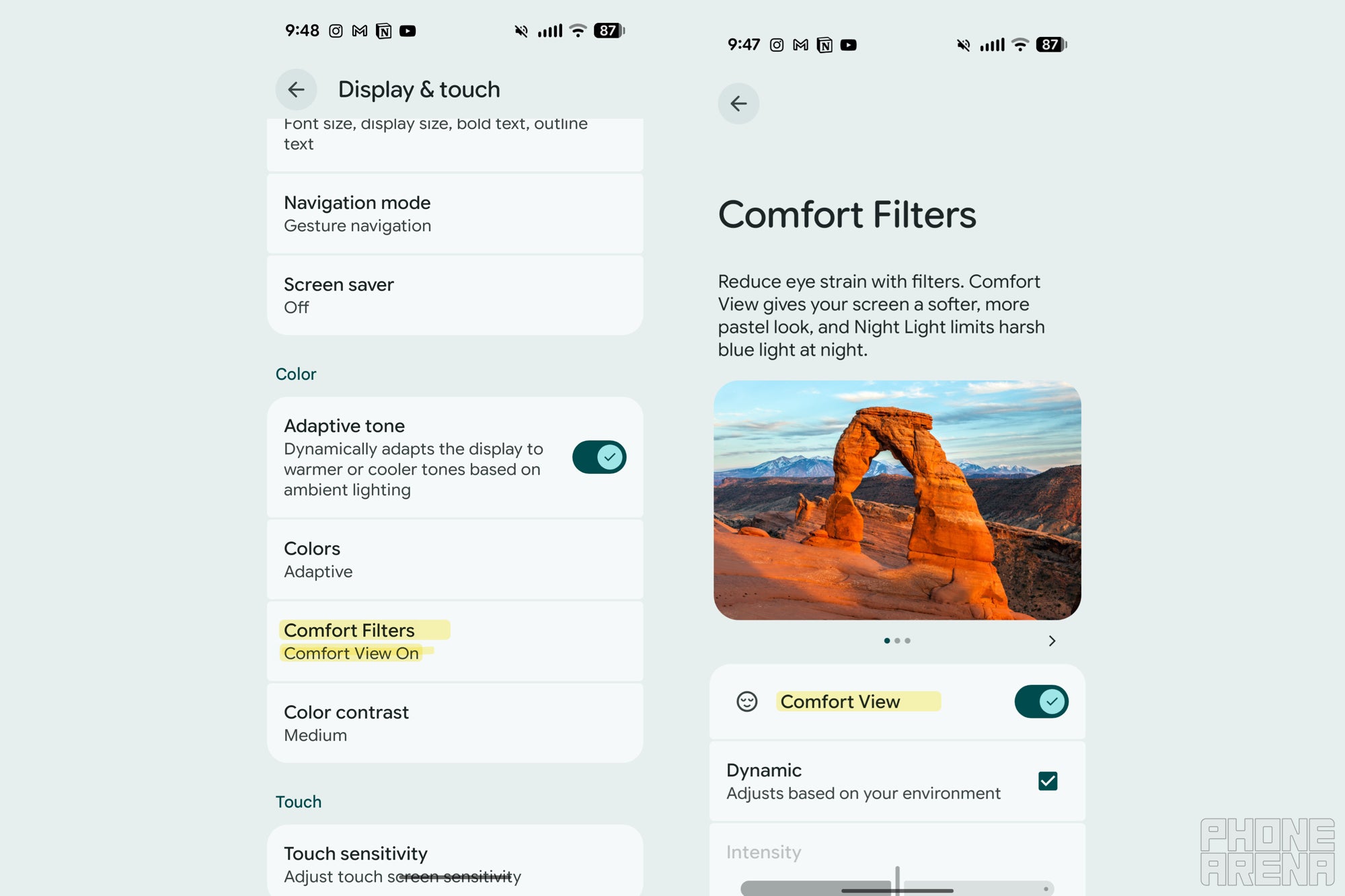
    Comfort view settingsComfort view settings

    Pixel’s new ‘Comfort Filters’ setting. | Image by PhoneArena

    Why this matters more than Google is letting on

    In our Pixel 10 Pro review, we called the screen amazing, fast, and very bright. That’s exactly the kind of display that benefits most from a comfort mode, because all that brightness and saturation can wear your eyes out fast.This is also the second eye-comfort feature Google has added in under a year, following the Sensitive Eyes setting introduced with the Pixel 10 Pro family. Apple gave us Display Pulse Smoothing on iPhone 17, sure, but Samsung is still dragging its feet on PWM dimming, and neither has anything quite like Comfort View.

    My early impression after flipping the switch

    I’ll be honest, I had this feature sitting on my Pixel 10 Pro Fold for a while and never bothered to turn it on. I finally enabled it while writing this, and within minutes I noticed my eyes felt less strained, which is wild for something so simple.

    I’ll need to live with it for longer to see if the pastel look grows on me or starts feeling washed out, but my early take is positive. It’s a quietly thoughtful addition that does more for daily comfort than most flashy AI features, and it’s another reminder that the small stuff Google bakes into Pixel phones often hits harder than the headline-grabbing tools.

    If you’ve been doomscrolling at night and wondering why your eyes feel fried, this is worth trying tonight.

    Want my hot takes and behind-the-scenes coverage? Come follow me on X and Threads. I’d love to hear what you think of Comfort View once you flip it on.

    Get Visible as low as $20/mo for 1 year. Limited time offer with code: FRESHSTART

    Get Visible as low as $20/mo for 1 year. Limited time offer with code: FRESHSTART

    Offer Ends 6.1.2026 at 11.59pm ET. New members get $5/mo off the $25/mg Visible plan, $35/mo Visible+ plan, or $45/mo Visible+ Pro plan for the first 12 months. Promo code FRESHSTART required at checkout.


    Buy at Visible

    Read the latest from Johanna Romero

    #Google #slipped #Pixels #display #trick #Samsung #Apple #dont

    Apple display dont Google Pixels Samsung slipped trick
    Share. Facebook Twitter Pinterest LinkedIn Tumblr Email

    Related Posts

    Miss an iPhone payment? iOS 27 could lock you out of your apps

    I spent 72 hours with the Galaxy Z Fold 8: here is how the battery held up

    iPhone 18 Pro may end up with significantly cheaper OLED displays than before

    Add A Comment

    Leave A Reply Cancel Reply

    Editors Picks
    8.5

    Apple Planning Big Mac Redesign and Half-Sized Old Mac

    Autonomous Driving Startup Attracts Chinese Investor

    Onboard Cameras Allow Disabled Quadcopters to Fly

    Top Reviews
    9.1

    Review: T-Mobile Winning 5G Race Around the World

    By
    8.9

    Samsung Galaxy S21 Ultra Review: the New King of Android Phones

    By
    8.9

    Xiaomi Mi 10: New Variant with Snapdragon 870 Review

    By
    circuitthoughts
    Facebook Twitter Instagram Pinterest Vimeo YouTube
    • Home
    • Tech
    • Gadgets
    • Mobiles
    • Our Authors
    © 2026 ThemeSphere. Designed by WPfastworld.

    Type above and press Enter to search. Press Esc to cancel.