

Subscribe to Updates

    Get the latest creative news from FooBar about art, design and business.

    What's Hot

    Starlink slammed for leaving users worse off, but critics are forgetting one detail

    Some Pixel models can't maintain a 5G connection after Android 17 was installed

    iPhone 18 Pro will easily get away with a $1,399 price tag

    Facebook Twitter Instagram
    • Tech
    • Gadgets
    • Spotlight
    • Gaming
    Facebook Twitter Instagram
    circuitthoughtscircuitthoughts
    Subscribe
    • Home
    • Gadgets
    • Insights
    • Apps

      Google Uses AI Searches To Detect If Someone Is In Crisis

      Gboard Magic Wand Button Will Covert Your Text To Emojis

      Android 10 & Older Devices Now Getting Automatic App Permissions Reset

      Spotify Blend Update Increases Group Sizes, Adds Celebrity Blends

      Samsung May Improve Battery Significantly With Galaxy Watch 5

    • Gear
    • Mobiles
      1. Tech
      2. Gadgets
      3. Insights
      4. View All

      Starlink slammed for leaving users worse off, but critics are forgetting one detail

      Some Pixel models can't maintain a 5G connection after Android 17 was installed

      iPhone 18 Pro will easily get away with a $1,399 price tag

      T-Mobile claims it's not shifting roles to India, but secrecy around operations is raising suspicion

      March Update May Have Weakened The Haptics For Pixel 6 Users

      Project 'Diamond' Is The Galaxy S23, Not A Rollable Smartphone

      The At A Glance Widget Is More Useful After March Update

      Pre-Order The OnePlus 10 Pro For Just $1 In The US

      Motorola Edge+ Review: It Checks A Lot Of Boxes

      This Smartphone Concept Design Is Different… In A Good Way

      Twitter Just Made Searching Your Direct Messages Better

      That Netflix Price Hike Is Starting To Take Place

      Latest Huawei Mobiles P50 and P50 Pro Feature Kirin Chips

      Samsung Galaxy M62 Benchmarked with Galaxy Note10’s Chipset

      9.1

      Review: T-Mobile Winning 5G Race Around the World

      8.9

      Samsung Galaxy S21 Ultra Review: the New King of Android Phones

    • Computing
    circuitthoughtscircuitthoughts
    Home»Tech»Computing»Apple is bringing big parental control upgrades to your iPhone this fall
    Computing

    Apple is bringing big parental control upgrades to your iPhone this fall

    adminBy No Comments5 Mins Read
    Facebook Twitter Pinterest LinkedIn Tumblr Email
    Share
    Facebook Twitter LinkedIn Pinterest Email

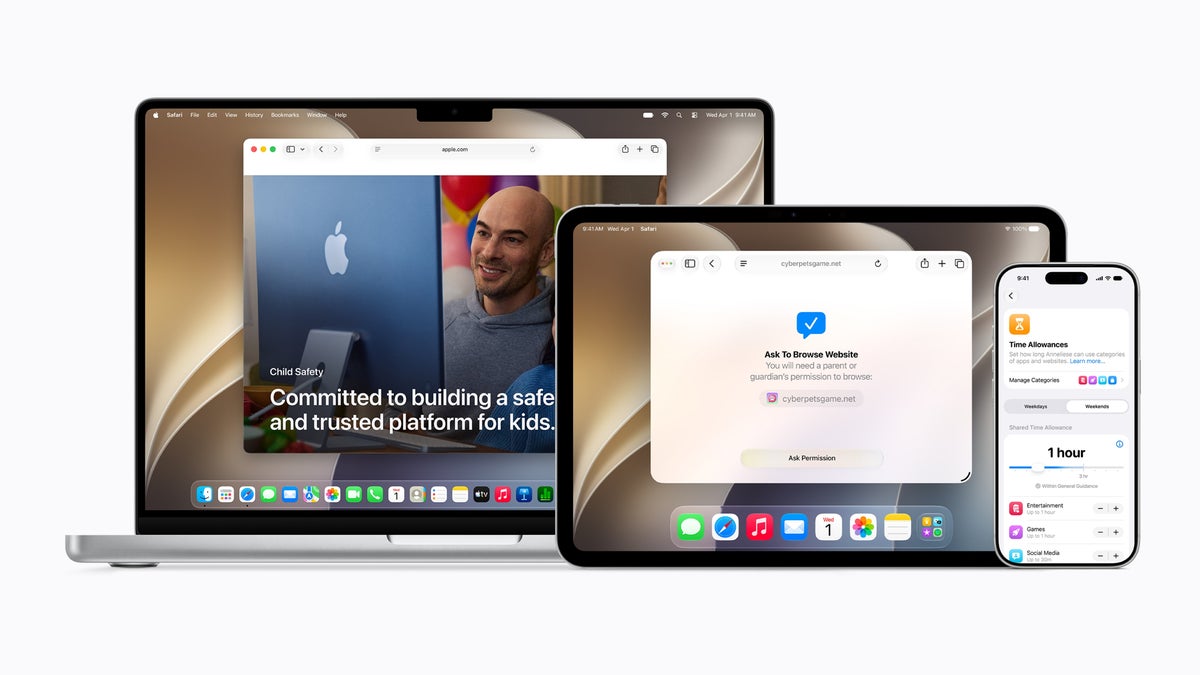
    Apple spent part of its WWDC26 keynote on something that does not usually get marquee billing: keeping kids safer on an iPhone. This fall, alongside iOS 27 and iPadOS 27, Apple is rolling out a refreshed set of parental controls that let parents manage what their kids can see, who they can talk to, and how long they can stay in an app. A lot of it will feel familiar, because Android families have had most of these tools for years, but the update still closes real gaps inside Apple’s world.

    It starts with a child account

    The whole system hangs on setting up a child account, which Apple now walks parents through during device setup. Once it is active, age-appropriate protections switch on across the system, like limiting adult websites, restricting media, and setting age-based limits in the App Store.
    A child account is required for kids under 13 and available for anyone up to 18.

    Our approach to helping families create safer digital experiences is grounded in the belief that every child is unique.

    — Sumbul Desai, M.D., Apple’s VP of Health and Fitness

    Choosing which apps your kid can open

    After the account is set, parents pick exactly which apps show up on the device. You can start with a small set of essentials, a curated bundle, or hand-pick each one, then add more over time as you see fit.This pairs with Ask to Buy, the existing tool that makes kids request approval before downloading anything from the App Store, free or paid, or making an in-app purchase.
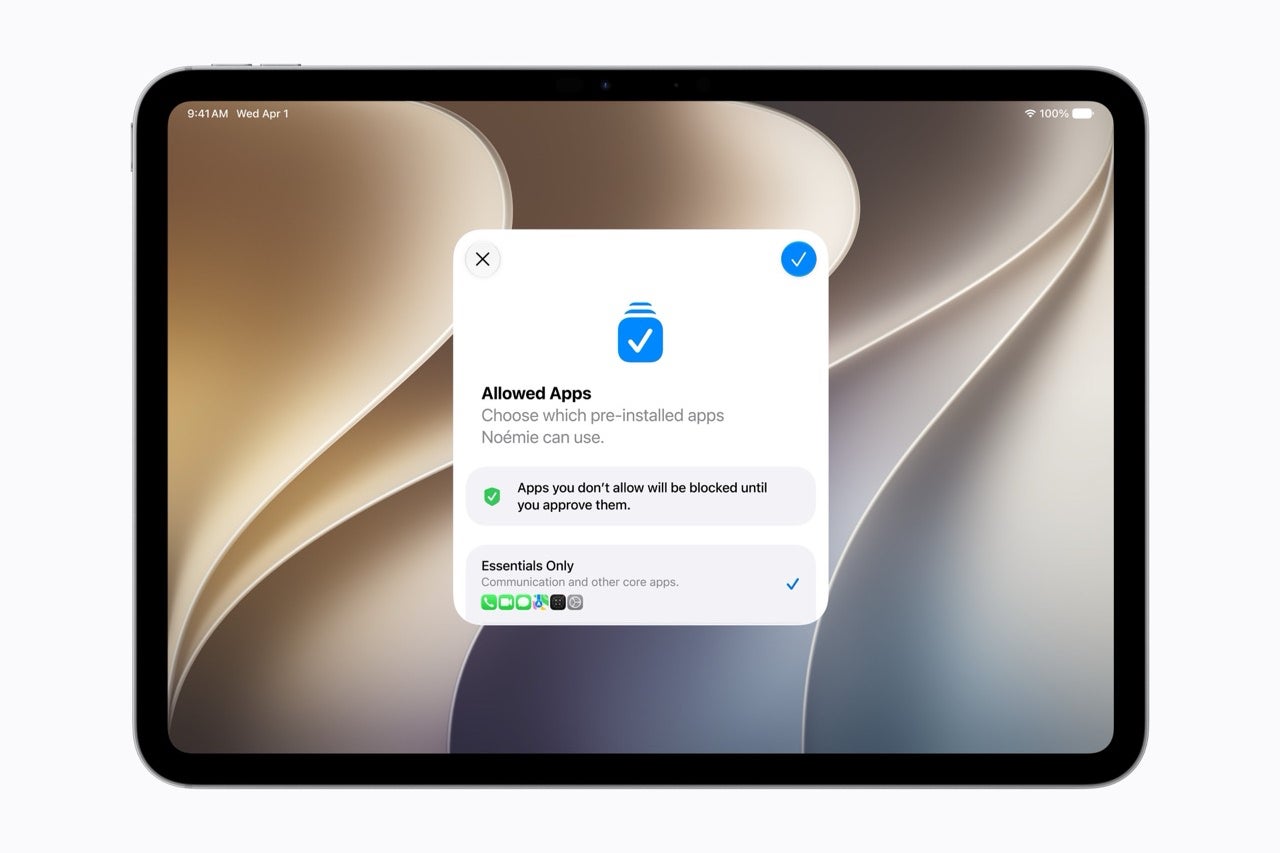
    An iPad setup screen titled Allowed Apps with an Essentials Only option, letting a parent choose which pre-installed apps a child can use.An iPad setup screen titled Allowed Apps with an Essentials Only option, letting a parent choose which pre-installed apps a child can use.

    Parents can start a kid off with just essential apps and approve more over time. | Image by Apple

    A new Ask to Browse for the web

    The fresh addition here is Ask to Browse. It makes kids request permission before opening a new website in Safari, and it works across iPhone, iPad, and Mac.

    This is one spot where Apple actually pulls ahead. Google’s Family Link can lock a child’s Chrome to approved sites, but its web filtering outside Google’s own services has long been the weaker part of the package. Wiring approval straight into Safari at the system level is a cleaner answer to the same problem.
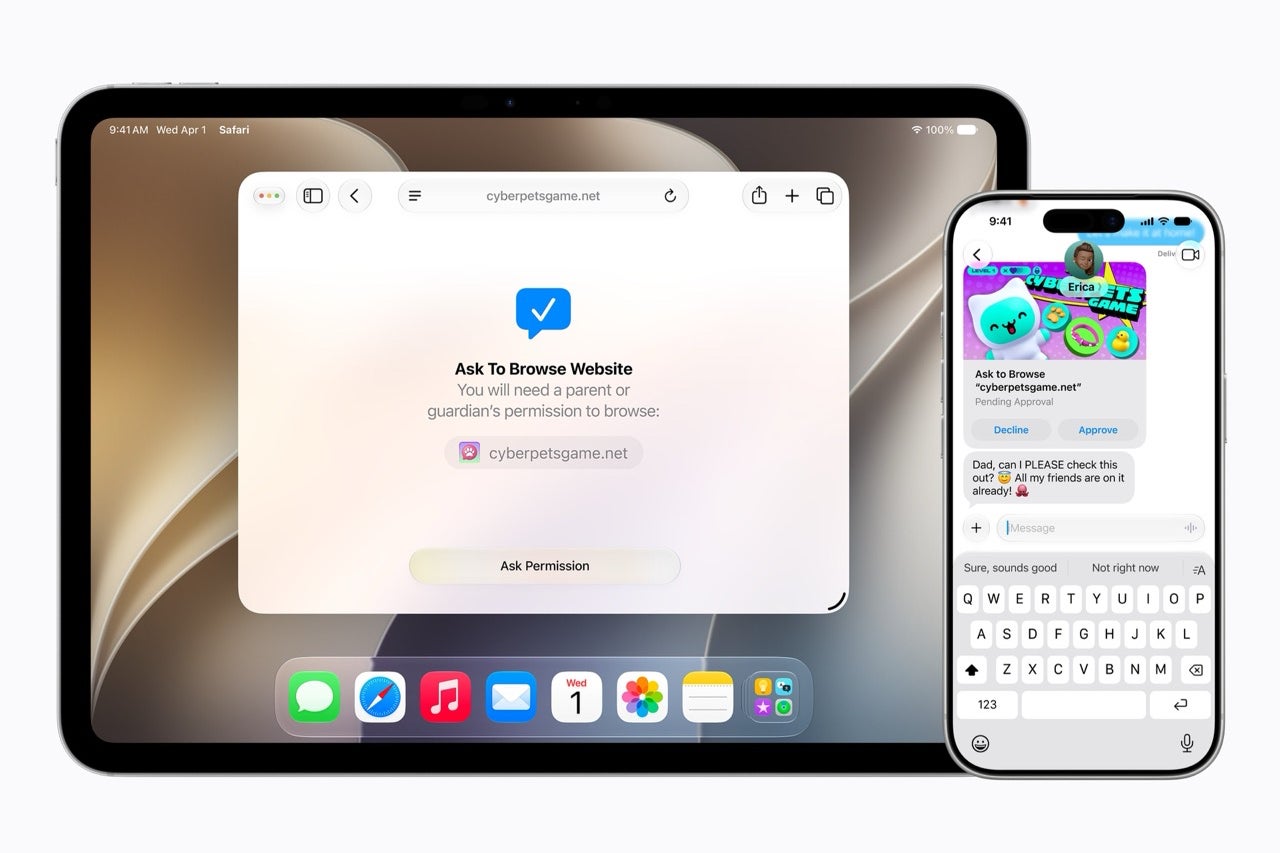
    An iPad and iPhone showing the Ask to Browse prompt, where a child must request a parent's permission before opening a new website in Safari.An iPad and iPhone showing the Ask to Browse prompt, where a child must request a parent's permission before opening a new website in Safari.

    Ask to Browse makes kids request approval before opening a new site in Safari. | Image by Apple

    Managing who your kid can talk to

    Parents can manage who their children reach over Messages, FaceTime, and Phone, and can require approval before a kid connects with anyone new. Communication Safety, already on by default for users under 18, blurs sensitive images, and it will now step in to block violent content too.

    New ways to manage screen time

    Time Allowances let parents cap how long kids spend in app categories like Entertainment, Games, and Social Media, with adjustable starting suggestions based on expert research. Daily Schedules control which apps work at which times, so a kid can stay focused during school hours.

    Screen Time itself has been redesigned into an at-a-glance view of average usage and top apps, with quick taps to limit or extend access in the moment.
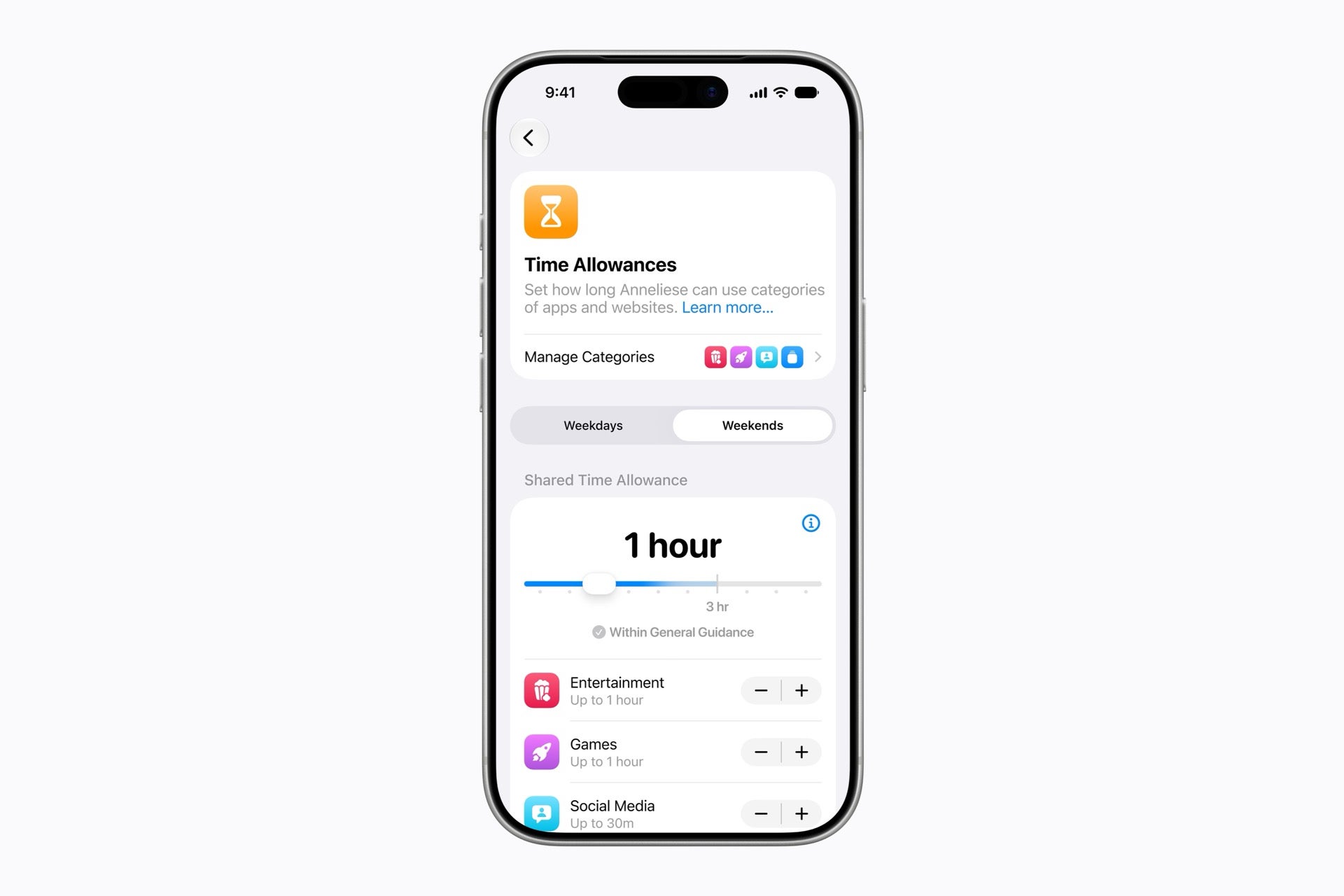
    An iPhone Time Allowances screen with a slider set to one hour and per-category caps for Entertainment, Games, and Social Media.An iPhone Time Allowances screen with a slider set to one hour and per-category caps for Entertainment, Games, and Social Media.

    Time Allowances cap how long kids spend in app categories, with expert-based starting points. | Image by Apple

    How this matches up against Android

    The honest framing is that most of this is Apple catching up. Google’s Family Link has offered the same core controls for years, much of it free and built into Android. Apple is now matching it, with the Safari-level web approval as its own edge.

    There is also a gap worth flagging, and parents spotted it fast. On the r/apple subreddit, one user pointed out that all of this assumes the kid has their own Apple device. It does nothing for the parent who hands their own iPhone to a five-year-old for ten minutes at a restaurant. There is still no second-user mode or guest profile with controls on iPhone or iPad, the kind of multi-user setup Android tablets have offered for years. If you share one device with your kid, these protections do not really reach you.
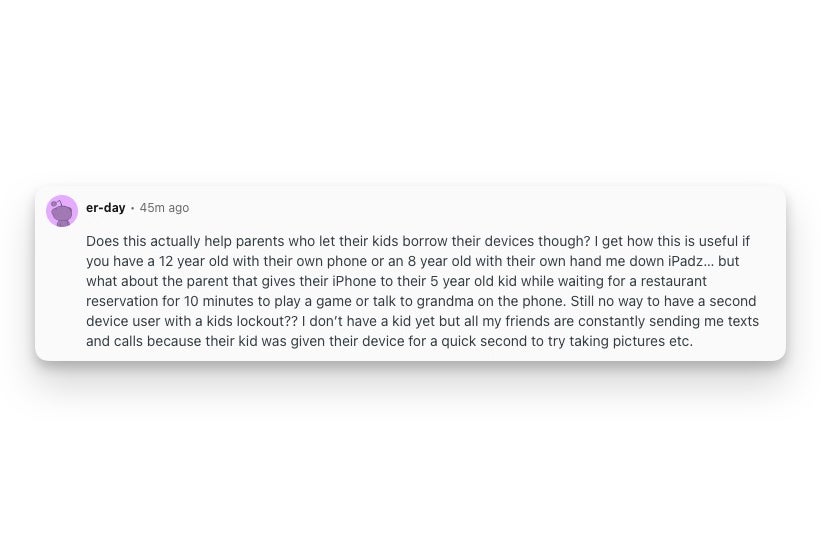
    Reddit post from r/apple by user er-day questioning whether Apple's new child safety features help parents who let young kids borrow their own iPhone or iPad, noting there is no second-user or kids lockout mode.Reddit post from r/apple by user er-day questioning whether Apple's new child safety features help parents who let young kids borrow their own iPhone or iPad, noting there is no second-user or kids lockout mode.

    A user on r/apple points out that the new controls do not cover a shared device handed to a young kid. | Image by er-day via Reddit

    When you can get it

    The new features arrive after you install the Screen Time update in iOS 27, iPadOS 27, and macOS 27 this fall. Howeverm, Apple notes the features are subject to change before release.

    Want more plain-English breakdowns of the stuff Apple and Google actually ship, plus the behind-the-scenes of how I cover it? Come find me on X at @jojothetechie and on Threads at @jojothetechie.

    Get Visible as low as $20/mo for 1 year. Limited time offer with code: FRESHSTART

    Get Visible as low as $20/mo for 1 year. Limited time offer with code: FRESHSTART

    Offer Ends 6.1.2026 at 11.59pm ET. New members get $5/mo off the $25/mg Visible plan, $35/mo Visible+ plan, or $45/mo Visible+ Pro plan for the first 12 months. Promo code FRESHSTART required at checkout.


    Buy at Visible

    Read the latest from Johanna Romero

    #Apple #bringing #big #parental #control #upgrades #iPhone #fall

    Apple Big bringing control fall iPhone parental upgrades
    Share. Facebook Twitter Pinterest LinkedIn Tumblr Email

    Related Posts

    Starlink slammed for leaving users worse off, but critics are forgetting one detail

    Some Pixel models can't maintain a 5G connection after Android 17 was installed

    iPhone 18 Pro will easily get away with a $1,399 price tag

    Add A Comment

    Leave A Reply Cancel Reply

    Editors Picks
    8.5

    Apple Planning Big Mac Redesign and Half-Sized Old Mac

    Autonomous Driving Startup Attracts Chinese Investor

    Onboard Cameras Allow Disabled Quadcopters to Fly

    Top Reviews
    9.1

    Review: T-Mobile Winning 5G Race Around the World

    By
    8.9

    Samsung Galaxy S21 Ultra Review: the New King of Android Phones

    By
    8.9

    Xiaomi Mi 10: New Variant with Snapdragon 870 Review

    By
    circuitthoughts
    Facebook Twitter Instagram Pinterest Vimeo YouTube
    • Home
    • Tech
    • Gadgets
    • Mobiles
    • Our Authors
    © 2026 ThemeSphere. Designed by WPfastworld.

    Type above and press Enter to search. Press Esc to cancel.